Chapter 1 Overview
This chapter contains the following sections :
Hardware Overview
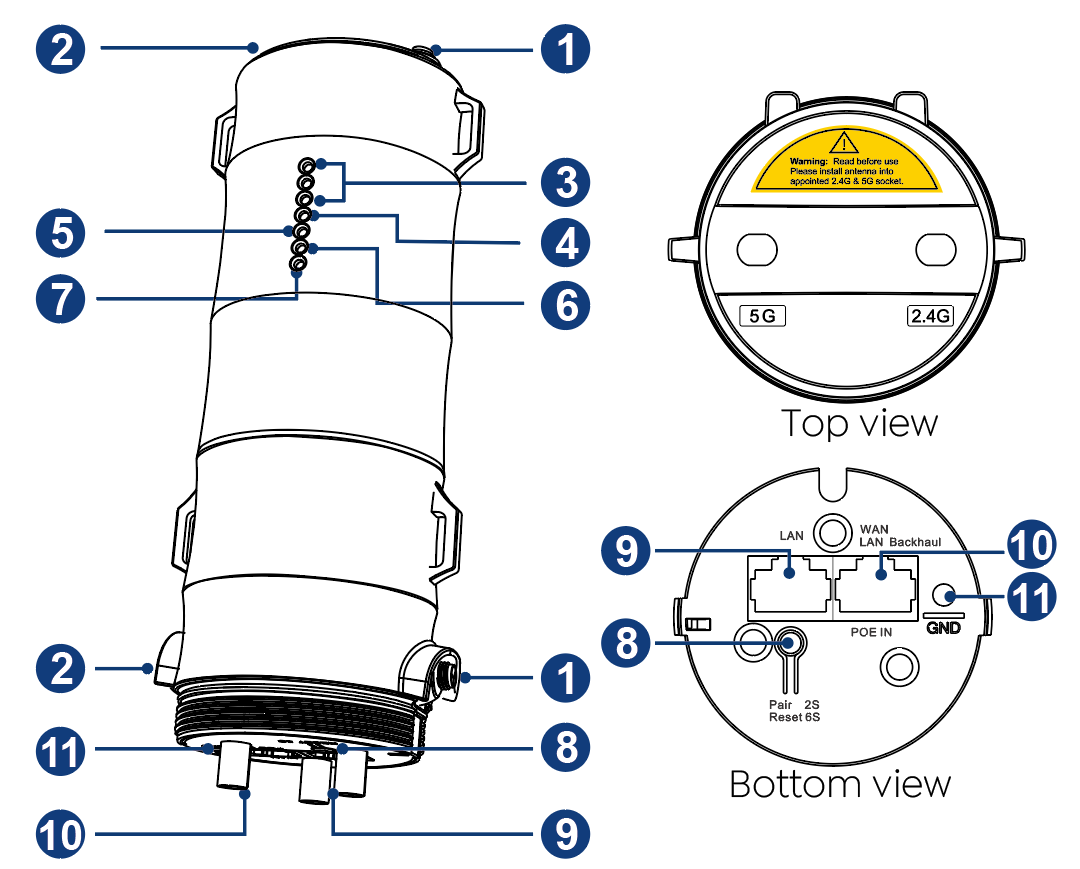
① 2.4G RP-SMA Antenna Connectors
② 5G RP-SMA Antenna Connectors
③ 3 x Wi-Fi Signal LEDs
④ Status LED
⑤ WAN/LAN Backhaul LED
⑥ LAN LED
⑦ POWER LED
⑧ Reset/PAIR Button
⑨ LAN Port
⑩ WAN(PoE IN)/LAN Backhaul
⑪ Grounding Terminal
- This product supports 802.3 AT/AF Active PoE and Passive PoE to supply power.
Default Parameters
Default IP: 192.168.30.1
Login Password: admin
2.4G SSID: WAVLINK-N_XXXX
5G/AC SSID: WAVLINK-AC_XXXX
LED Indicators
| Position | LED Status | Description |
|---|---|---|
| Power | On | The device is powered on. |
| Power | Off | The device is not receiving electrical power. |
| LAN | On | The Ethernet port is connected. |
| LAN | Off | The Ethernet port is disconnected. |
| WAN/LAN Backhaul | On | The Ethernet port is connected. |
| WAN/LAN Backhaul | Off | The Ethernet port is disconnected. |
| Status | Fast Flash | Another router has not been connected when the device is in the repeater mode. |
| Status | Slow Flash | The another router has been connected but the device has no access to the network in the repeater mode. |
| Status | On | The device keeps on in the AP mode; The device can access the network normally. |
Wi-Fi Signal
| Mode |  |  |  | Description |
|---|---|---|---|---|
| AP | ON | ON | ON | Wi-Fi signal output power 100%. |
| Repeater | ON | ON | ON | Better reception: signal 81%-100%. |
| Repeater | ON | ON | OFF | Good reception: signal 60%~80%. |
| Repeater | ON | OFF | OFF | Weak reception: signal below 0%~59%. |
| Mode | | | | Description |
|---|---|---|---|---|
| Mesh Router | ON | ON | ON | Wi-Fi signal output power 100%. |
| Mesh Extender | ON | ON | ON | Better reception: signal 81%-100%. |
| Mesh Extender | ON | ON | OFF | Good reception: signal 60%~80%. |
| Mesh Extender | ON | OFF | OFF | Weak reception: signal below 0%~59%. |