Chapter 1 Overview
This chapter contains the following sections :
• Overview
Overview
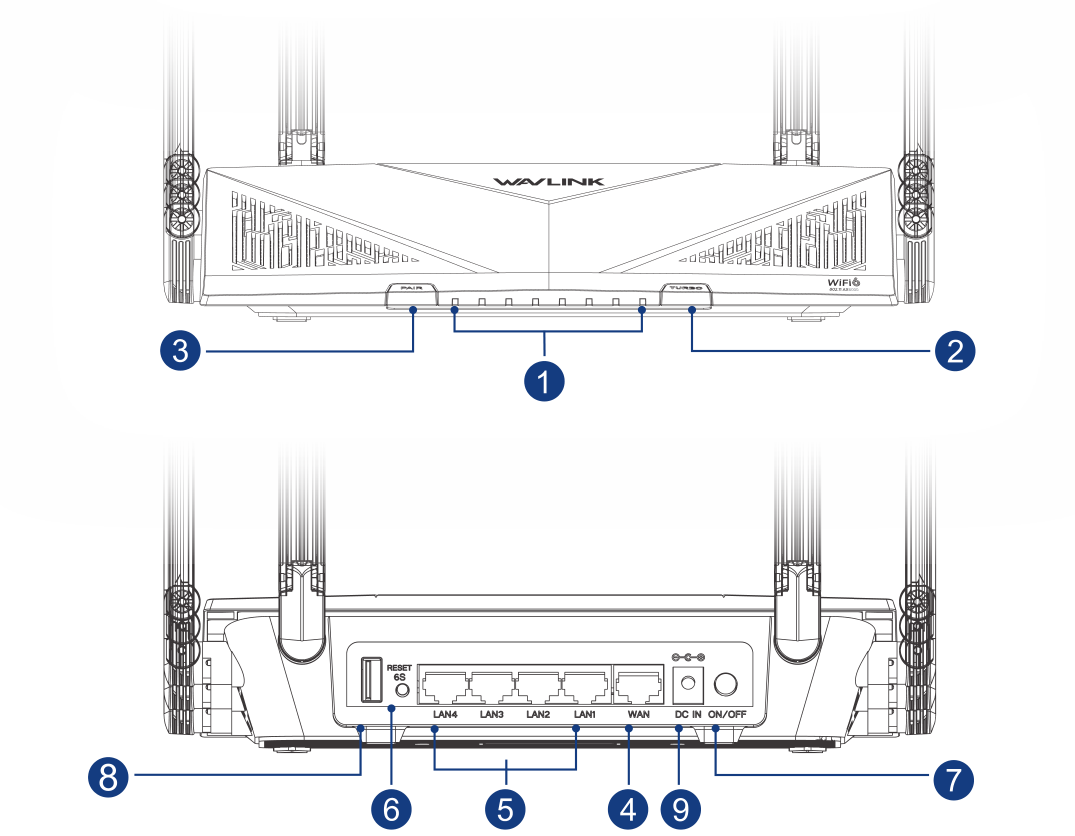
① Status LED
② Turbo Button
③ PAIR Button
④ 1 x 2.5G WAN Port
⑤ 4 x Gigabit LAN Ports
⑥ Reset Button
⑦ Power ON/Off Button
⑧ USB 3.0 Port
⑨ Power IN Port
PAIR Button: Press and hold for 2 seconds to pair with the existing Mesh WiFi system.
Reset Button: Press and hold for at least 6 seconds to reset the router.
Turbo Button: Press this button to clean the router's cache.
LED Indicator
| LED | Status and Description |
|---|---|
| WiFi | Solid on: WiFi enabled Off: WiFi disabled |
| WAN | Blinking: The WAN port is transmitting or receiving data Off: The WAN port is not connected properly |
| LAN1/2 LAN3/4 | Blinking: The LAN port is transmitting or receiving data Off: The LAN port is not connected properly |
| Status LED | Solid on: The device is on and has network connection Slow flashing: The device is pairing Fast flashing: Turbo button is working Fast flashing: The device has no network connection Off: The device is not turned on |
| Power | Solid on: Powered on Off: Powered off |
Basic Info
Default IP: http://192.168.20.1
Login: http://wavlogin.link
Mesh SSID: WAVLINK-Mesh_XXXX
Official Website: www.wavlink.com
Technical Support: support@wavlink.com
More Translations Download PDF