Chapter 9 Network Security
This chapter contains the following sections:
• Firewall
Firewall
 1 . Access More>Security>Firewall.
2 . Open Block Ping: It can prevent ping attacks and scanning and reduce the risk of network attacks on this device.
3 . Open Port Scan Blocking: It can protect server ports on devices from attacks.
4 . Open Block DDoS Attacks: It enables the router to avoid the massive resource consumption caused by DDoS attacks and ensures normal services.
5 . Click SAVE to finish the configuration.
ALG Configuration
ALG(Application Layer Gateway)allows a custom NAT traversal filter to be inserted into the gateway to support the address and port translation of certain application layer “control/data” protocols. Keeping default settings is recommended. When you use voice and video applications to create or receive calls through the router, you may need to disable SIP ALG because some voice and video applications do not work well with SIP ALG.
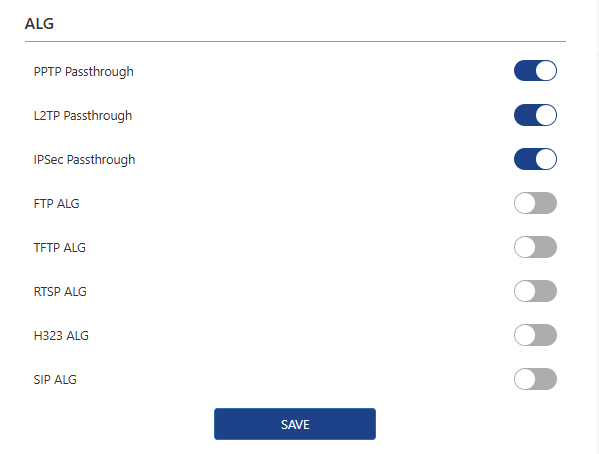
1 . Access More>Security>ALG.
2 . After configuration, please click SAVE to finish.
MAC Filter
MAC address filtering applies to devices on the wireless/wired network. Devices on the filter list will be unable to access the Internet and will also be blocked from the router's management interface.
Note: This function may not work for terminals that use random MAC addresses.

1 . Click Security > MAC Filter.
2 . Click MAC Filter to enable it.
3 . If the Guest Network Exception is enabled, the devices in the guest Wi-Fi will not be blocked by this function.
4 . Click ADD to add new rule.
4.1 Select corresponding Device Name and MAC address from the list.

4.2 Or manually input Device Name and MAC address to add device.

5 . After adding the device, you can edit or delete the devices added.
