章节 1 产品预览
本章节分为以下几个部分:
• 包装清单
• 系统要求
• 产品特性
• 接口概览
包装清单
1 × USB4 MST DP2.1 三显扩展坞
1 × DC 20V电源适配器
1 × 80Gbps USB4 Type-C转Type-C数据线
1 × 螺丝刀
1 × 快速入门指南
1 × 保修卡
系统要求
Windows 7/8/10/11
Mac OS 10.15 或更高版本(可扩展2台不同显示器)
产品特性
- 兼容USB4、雷电3、USB3.2 Gen2×2以及DP2.1 Alt模式。
- 2个DP接口支持DP2.1标准,分辨率7680x4320@60Hz。
- 2个USB4接口支持40Gbps数据传输以及DP2.1标准,分辨率7680x4320@60Hz。
- 支持三屏显示,分辨率4K@120Hz*3。
- 当Mac连接该设备时,可支持2台不同的外接显示器。
- 1个USB3.2 Gen2×2接口,支持20Gbps数据传输速率。
- 1个M.2接口可外接固态硬盘,实现20Gbps的数据传输速率。
- 1个USB-C上行端口可为主机提供100W功率充电。
接口概览

① USB-C(20Gbps)
② USB4(40Gbps)
③ 固态硬盘指示灯(充电时蓝色长亮;读写数据时闪烁)
④ 电源指示灯(充电时蓝色长亮)
⑤ 电源按钮(短按开启/关闭)
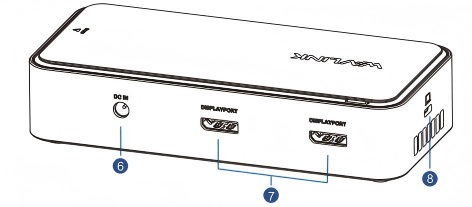
⑥ DC IN口(130W)
⑦ DP接口
⑧ USB-C上行口(主机,PD100W)
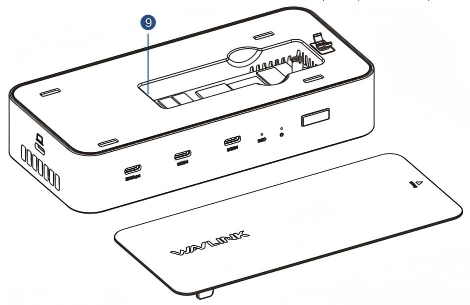
⑨ M.2固态硬盘插槽(20Gbps)
下载PDF