Chapter 3 Firmware Upgrade, FAQ and Aftersale Service
This chapter introduces FAQ and aftersale service infomation.
It contains the following sections :
• FAQ
• GNU General Public License Notice
Firmware Upgrade
AP/Repeater Mode Firmware Update
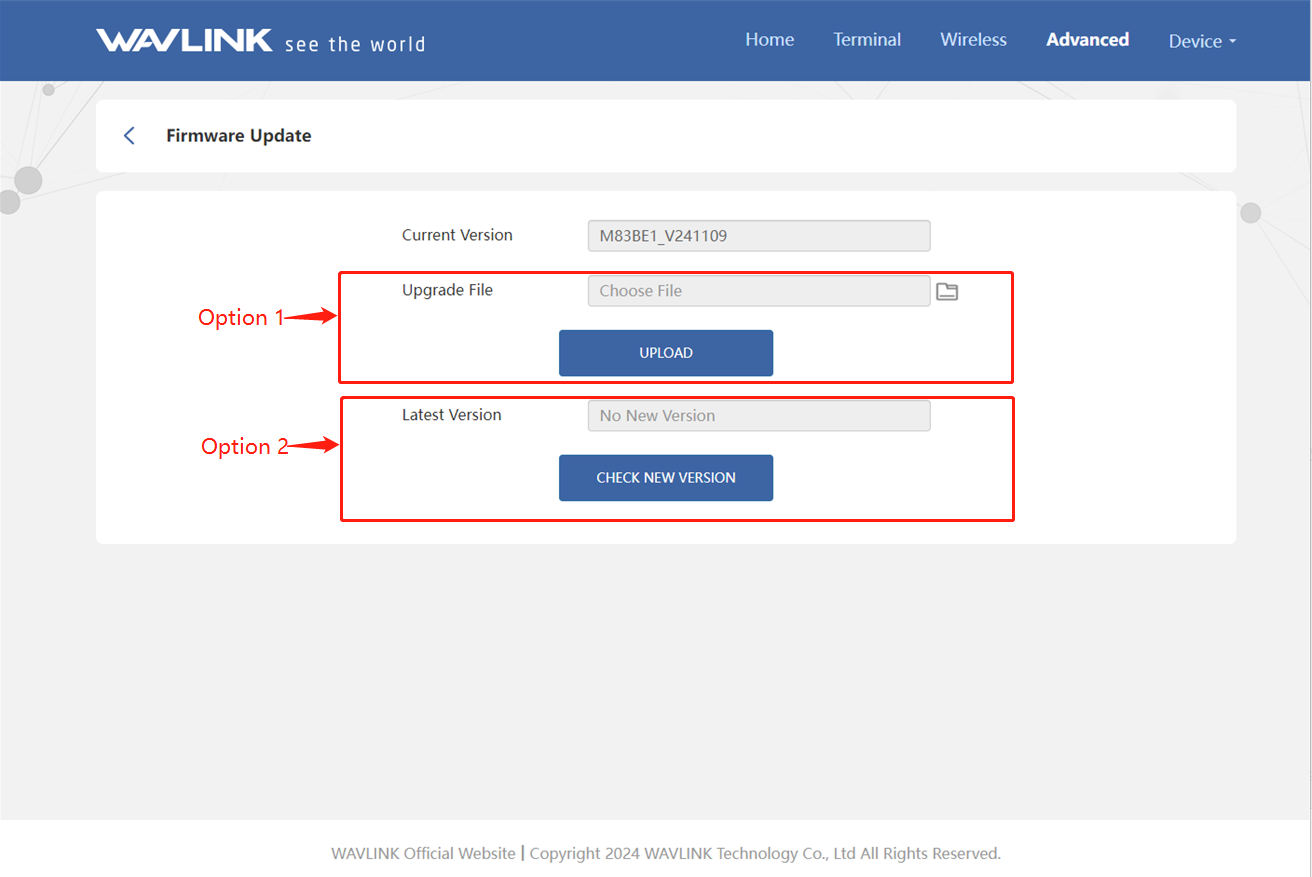
1.Please enter 192.168.30.1 or http://waplogin.link in the address bar. Then choose Advanced->Firmware Upadate.
2.1.Option 1
2.1.1 Click on file icon to locate the extracted firmware file.
2.1.2 Click on UPLOAD and choose Apply, and wait for the firmware upgrade process to complete.
2.2.Option 2
2.2.1.Click on CHECK NEW VERSION to find the latest version.
2.2.2.Click on DOWNLOAD AND UPGRADE, and wait for the firmware upgrade process to complete.
FAQ
Q1. How do l turn off the LED light if it affects my sleep?
- Please go to Advanced > LED Control to manage the light status.
Q2. Why can't I visit the web UI by inputting the IP address 192.168.30.1 or http://waplogin.link?
- If you can't log in with AP Mode, please check the IP address arranged by the upstream router, use the new IP address to log in.
- Make sure you have connected to the Wi-Fi of the device.
- Please try to clean the cache of the browser.
- Try to log in the management page via another browser.
- Try to log in the management page via other devices.
Q3. How do I choose the modes?
Please choose the mode that suits you :
- In AP Mode, it extends network coverage by connecting to higher-level devices via network cable;
- In Repeater Mode, it's extends network coverage via wireless;
- Mesh Extender Mode extends network coverage through mesh networking.
Q4.What should I do if I forget my manage password?
- Try to ensure if you can log in with wireless password, if not, please restore factory settings.
- Feel free to contact us.
GNU General Public License Notice
This product includes software codes developed by third parties. These software codes are subject to either the GNU General Public License (GPL). Version 2, June 1991 or the GNU Lesser General Public License (LGPL), Version 2.1, February 1999. You can copy, distribute, and/or modify in accordance with the terms and conditions of GPL or LGPL. The source code should be complete, if you want us to provide any additional source code files under GNU General Public License (GPL), please contact us in these matters. We are committed to meeting the requirements of the GNU General Public License (GPL). You are welcome to contact our local office to get the corresponding software and licenses, Please inform us of your contact details (full address) and the product code. We will send you a software package with the software and license for free. The respective programs are distributed WITHOUT ANY WARRANTY; without even the implied warranty of MERCHANTABILITY Or FITNESS FOR A PARTICULAR PURPOSE Please refer to the GNU General Public License website for further information.
http://www.gnu.org/licenses/old-licenses/lgpl-2.0.html
http://www.gnu.org/licenses/gpl.html
Aftersale Service