Chapter 1 Basic Information
This chapter introduces the repeater's appearance and some basic infomation.
It contains the following sections :
• Overview
Overview
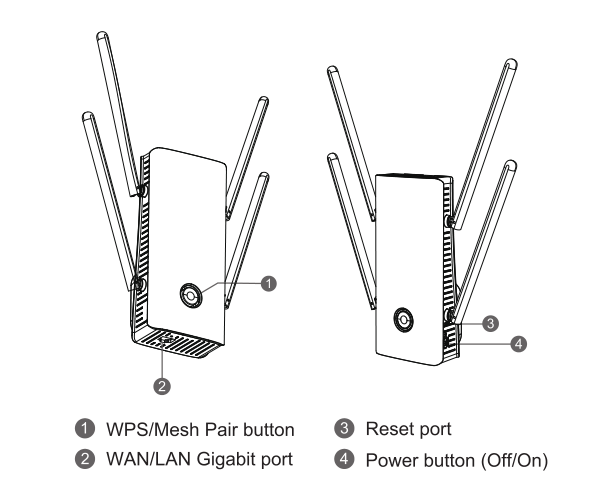
Reset Button: Press and hold the button for 6 seconds until the indicator is solid purple.
WPS/Pair Button: Press and hold the button for 3 seconds to start pairing until the indicator is blue and slowly flashing. Paired successfully, then the indicator is solid blue. Pairing failed, the indicator is red and fast flashing.
LED Indicator
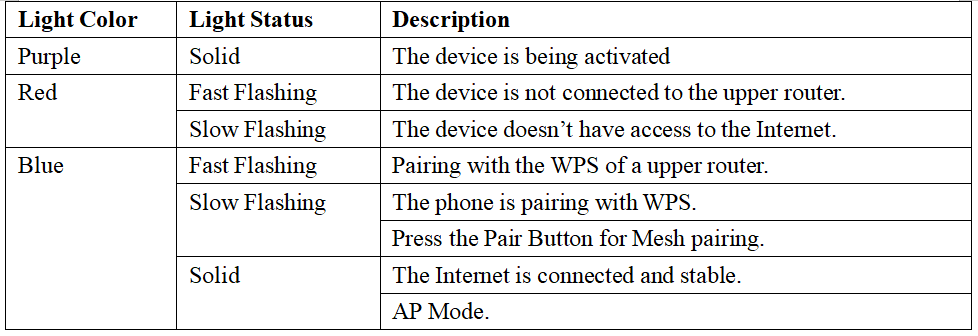
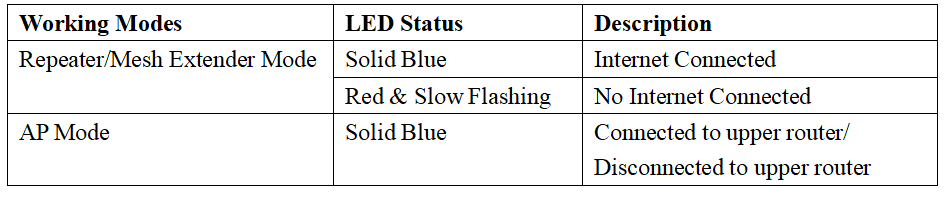
"Slow" being 0.3 seconds.
"Fast" being 1.2 seconds.
Basic Info
2.4G SSID: WAVLINK-BE_XXXX
5G SSID: WAVLINK-BE_5G_XXXX
Default lP: 192.168.30.1
Login: http://waplogin.link
Official website: www.wavlink.com
Technical support: support@wavlink.com