Chapter 1 Overview
This chapter contains the following sections :
Package Content
Verify if included accessories match the description:
- 1×USB-C Docking Station
- 1×USB-C to USB-C Cable(with E-mark)
- 1×DC20V/2A Power Adapter
- 1×Quick Start Guide
System Suggestion
- Microsoft Windows 10/11
- Apple Mac OS 11 or later(Can extend a display ONLY)
- CPU i7 or higher, RAM 8GB or above
- Laptop/PC at least has one Thunderbolt 3/4/5 or full-functional USB-C port with Video Alt Mode and Data Transfer
- To use PD function, it requires laptop to support PD3.0
Product Overview
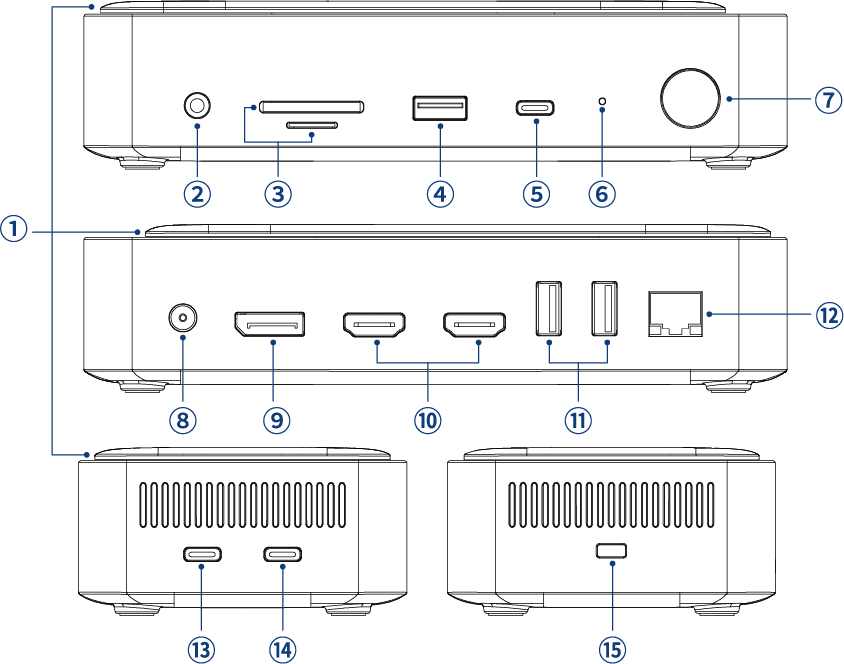
① M.2 Enclosure(PCle/SATA)
②Audio
③SD/TF Card Reader
④USB-A(10Gbps and BC)
⑤USB-C(10Gbps and BC)
⑥LED
⑦Power Button
⑧DC IN
⑨DisplayPort(8K@30Hz/4K@144Hz)
⑩HDMI
⑪USB-A(5Gbps)
⑫2500Mbps RJ45 Ethernet
⑬USB-C(Host)
⑭USB-C PD IN(PD 100W)
⑮Lock
note
If you want to charge the computer through the upstream port, you need to connect the PD charge that comes with your computer to the USB-C PD IN port on the Dock, otherwise the computer cannot be charged.