Chapter 1 Overview
This chapter contains the following sections :
• Overview
Overview
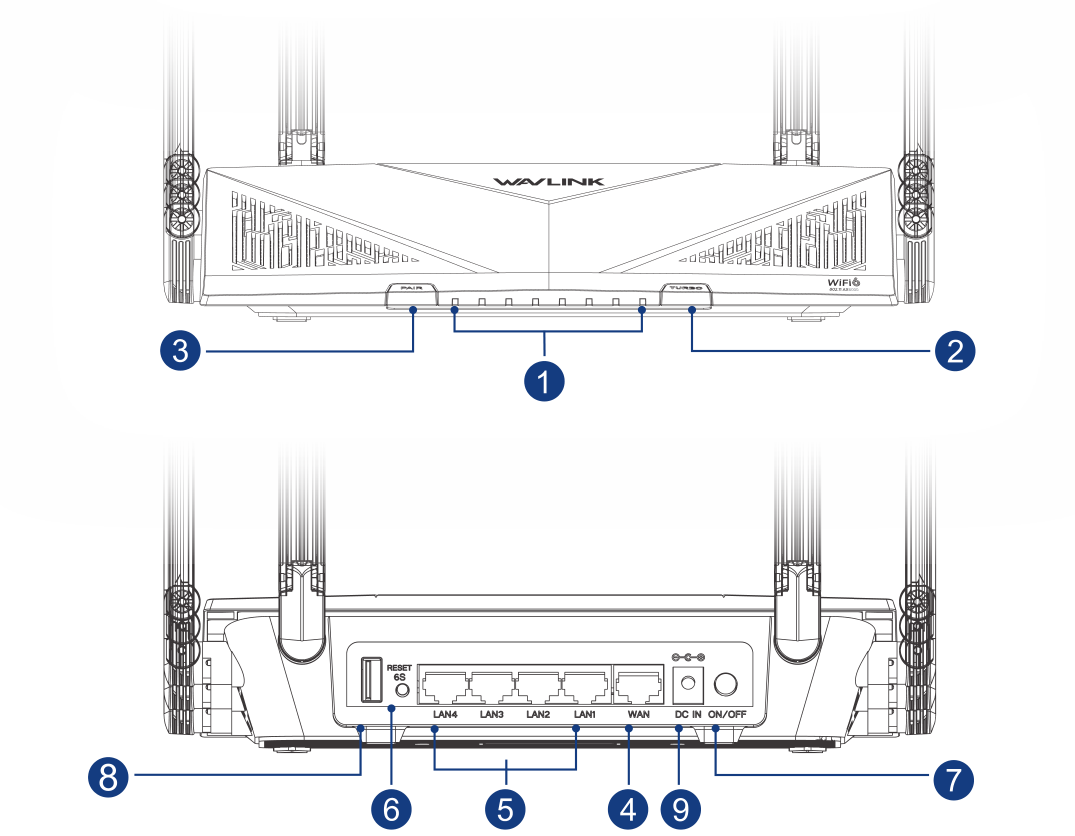
① Status LED
② Turbo Button
③ Pair Button
④ 1 x 2.5G WAN Port
⑤ 4 x Gigabit LAN Ports
⑥ Reset Button
⑦ Power Button
⑧ USB 3.0 Port
⑨ DC IN (12V)
Pair Button: Press and hold for 2 seconds to pair with the existing Mesh WiFi system.
Reset Button: Press and hold for at least 6 seconds to reset the router when the device is powered on.
Turbo Button: Press this button to clean the router's cache.
LED Indicator
| LED | Status and Description |
|---|---|
| WiFi | Solid on: WiFi enabled Off: WiFi disabled |
| WAN | Blinking: The WAN port is transmitting or receiving data Off: The WAN port is not connected properly |
| LAN1/2 LAN3/4 | Blinking: The LAN port is transmitting or receiving data Off: The LAN port is not connected properly |
| Status LED | Solid on: The device is on and has network connection Slow flashing: The device is pairing Fast flashing: Turbo button is working Fast flashing: The device has no network connection Off: The device is not turned on |
| Power | Solid on: Powered on Off: Powered off |
Basic Info
Default IP: http://192.168.20.1
Login: http://wavlogin.link
Mesh SSID: WAVLINK-Mesh_XXXX
Official Website: www.wavlink.com
Technical Support: support@wavlink.com
Specifications
- Wireless Standards: IEEE 802.11b/g/n/a/ac/ax.
- Frequency Band/Speed: 5GHz 4804Mbps + 2.4GHz 1148Mbps.
- Wireless Security: WPA2/WPA3-PSK MIX, WPA/WPA2-Enterprise.
- Working Mode: Router/AP/Repeater Mode.
- Everything Mesh: Forming a Mesh network with a single Wi-Fi name for seamless whole-home coverage.
- Antenna: 8×5dBi omnidirectional antennas.
- Ports: 1×WAN (2.5Gbps), 4×LAN (1000Mbps), 1×USB-A 3.0, 1×DC IN.
- Status LED (Blue): 4×LAN, 1×WAN, 1×Wi-Fi, 1×Power, 1×Status.
- Buttons: 1×Power, 1×Reset (6s), 1×Pair (2s), 1×Turbo.
In the Box
- 1 × Wi-Fi 6 AX6000 Dual Band 2.5G Mesh Router
- 1 × Power Adapter
- 1 × Ethernet Cable
- 1 × Quick Start Guide