Chapter 1 Overview
This chapter contains the following sections :
• Overview
Overview
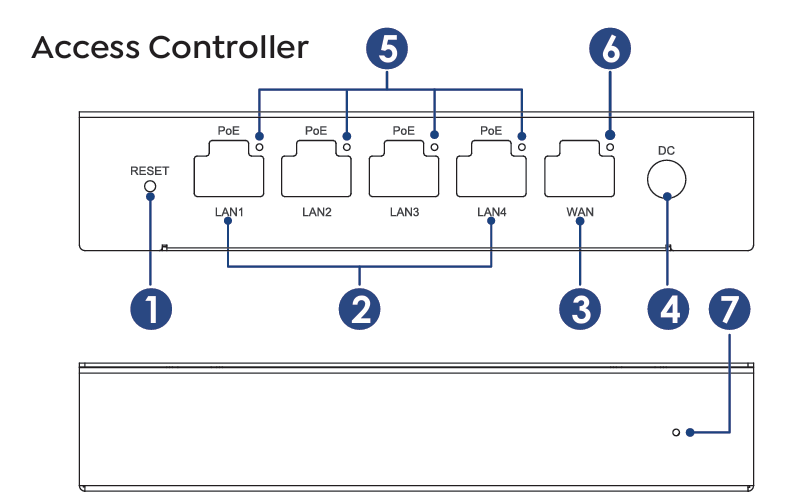
① Reset Button
② LAN Port (PoE)
③ WAN Port
④ Power Port
⑤ LAN LED
⑥ WAN LED
⑦ Status LED
Reset Button
When powered on, the device completes startup. Press and hold the reset button for 6s to restore factory settings.
Basic Info
Login: http://wavlogin.link
Default IP: 192.168.10.1
Official Website: www.wavlink.com
Technical Support: support@wavlink.com
LED Indicator
| LED | Status | Description |
|---|---|---|
| LAN/WAN LED | ON/Blinking | Data transmitting |
| LAN/WAN LED | OFF | Ethernet cable not connected |
| Status LED | ON | Internet connected |
| Status LED | Blinking | No Internet |
| Status LED | OFF | No power |
Specification
- 5 Gigabit Ethernet ports, 1 * WAN+ 4 * LAN.
- LAN ports all support active PoE power supply, compliant with IEEE 802.3at/af standards.
- Combines PoE power, AC controller and routing technology.
- Auto-identification and centralized AP management.
- Improvement of WLAN coverage.
- Supports AP customized group management.
- Supports Wi-Fi configuration for guest-only networks.
- Supports LED indicators to display the device status.
In the Box
- 1 × Full Gigabit PoE Access Controller
- 1 × RJ45 Ethernet Cable
- 1 × Power Adapter
- 1 × Quick Start Guide