Chapter 1 Basic Information
• Feature
• Overview
Introduction
This dock is built in slim, light and miniature case, it is designed to meet more demands of extra USB peripherals and monitors. To extend the content of your AV sources, you can select either one of three video interfaces: VGA, HDMI, and DisplayPort.
In addition, you can also connect your laptop to the upstream USB-C port and get it charged. The dock also provides you four USB interfaces so as to enable you to enjoy high speed data transfer.
Feature
USB Power Delivery
The power in USB-C port is compliant with USB power delivery specifcation revision 3.0 and supports up to 100W power supply including max. 85W PD charging to laptop.
USB Data Transmission
The MST dock has two USB 3.0 and two USB 2.0 ports, providing your devices plenty of connection possibilities. USB 3.0 provides data transfer rate up to 5Gbps.
Triple Display
This MST dock has 3 different video ports, you can either select one port or combine two or all three of them for your own needs.
RJ45 Gigabit Ethernet
Gigabit Ethernet port provides high-speed network and is backward compatible with 10/100Mbps networks.
SD/Micro SD Card Reader
Support SD V2.0 /SDHC(Up to 32GB), compatible with SDXC(Up to 2TB)
Overview
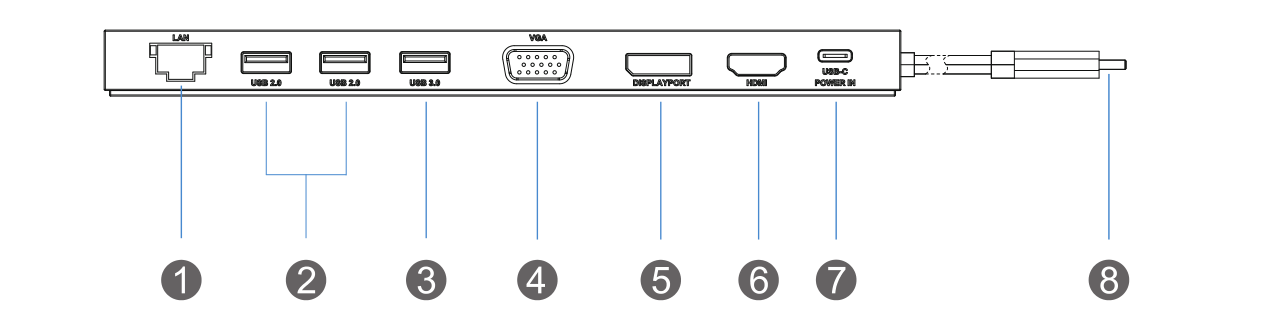
① Gigabit Ethernet port
② 2 x USB 2.0 port
③ 1 x USB 3.0 port
④ VGA connector
⑤ DisplayPort
⑥ HDMI port
⑦ USB-C power in
⑧ Upstream USB-C connector
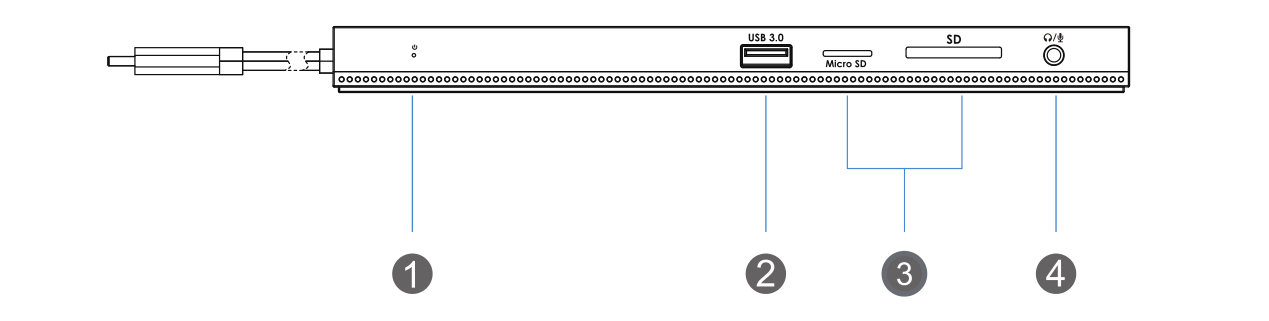
① LED indication
② 1 x USB 3.0 port
③ SD & Micro SD card reader
④ 1 x Combo audio port
- SD/TF card reader slot can not be used simultaneously.
System Requirement
-
Windows 10 or later
-
Mac 0S X or later(Can extend a different display ONLY)
-
Requires that host PC/laptop supports PD 3.0/2.0
-
PC/laptop with USB 3.1 full function Type-C port (Power Delivery, Displayport, Data Transfer)
In the Box
-
1 x USB-C Triple Display Docking Station
-
1 x Quick Start Guide