Chapter 4 FAQ & After Sales
This chapter includes FAQ and After Sales.
• FAQ
FAQ
Q1. SIM card cannot be detected
Potential cause:
-
SIM card is not matched or destroyed.
-
SIM card slot issue on router.
Troubleshooting:
-
Ensure that the SIM card is correctly installed and that it has good contact with the SIM card slot.
-
Try another SIM card.
-
Turn off the WAVLINK router, then remove the SIM card and gently wipe the metal contacts with a dry, soft cloth. Insert the SIM card into the slot in the correct direction. Turn on the WAVLINK router and try again.
Q2. No internet access when SIM card is detected
Potential cause:
-
The default APN profile of the router does not match the SIM card.
-
The SIM card is bound to the IMEI of a specific device.
-
Weak mobile signal or damaged LTE antenna.
-
The SIM card may be overdue on payment or have no data plan.
-
The supported band of the SIM card does not match the router.
Troubleshooting:
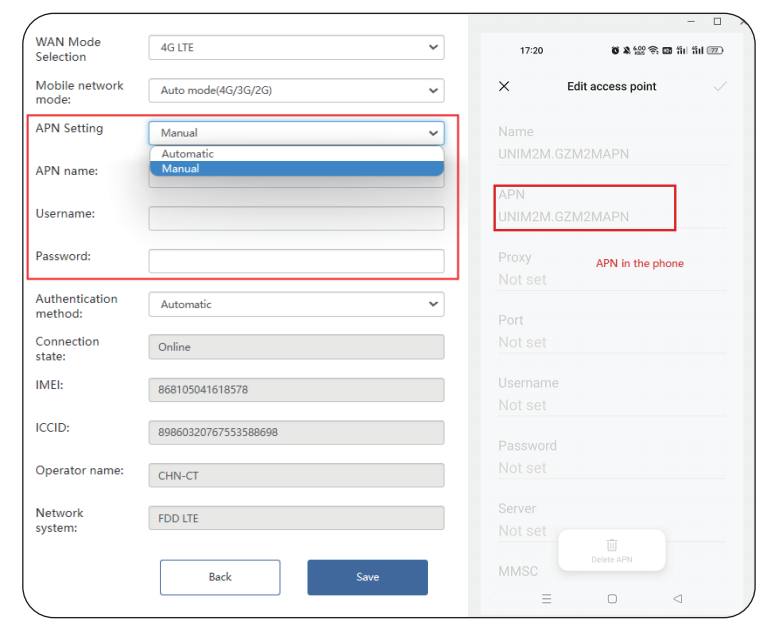
- Get the APN (Access Point Name) settings from your Mobile Service Provider or insert the same SIM card into your phone and find APN settings from phone. Then log into the web-base setup page of the router and select MANUAL to manually enter APN Settings, including APN Name, User Name, Password, and Authorization information.
-
Remove the IMEI binding with your SIM card carrier.
-
Relocate the router in a suitable place to get better 4G signal.
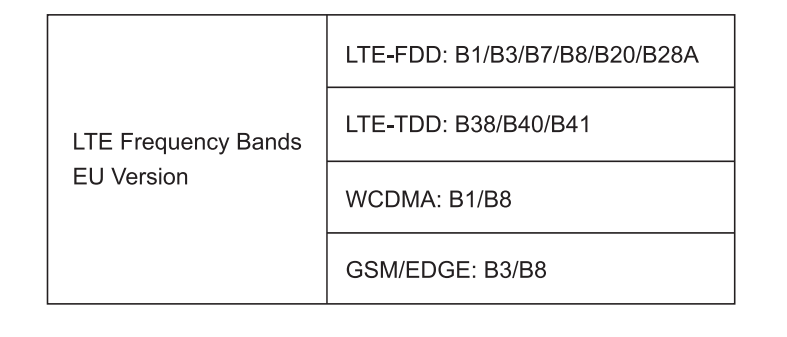
- Note: If you know the band your SIM card supports, go to the WAVLINK device's management page and select the corresponding band to optimize connection performance.
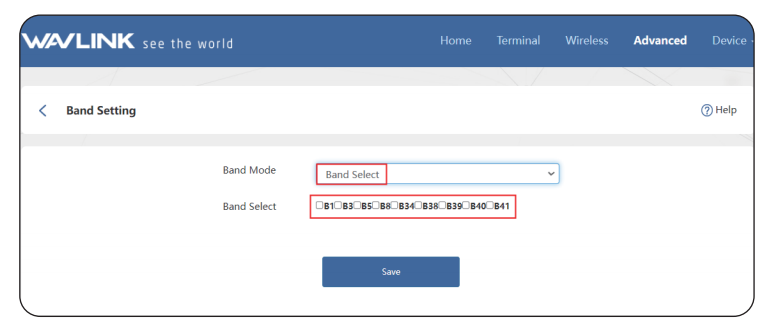
- Please check with your carrier to confirm which bands your SIM card supports.
GNU General Public License Notice
This product includes software codes developed by the third parties. These software codes are subject to either the GNU General Public Licence(GPL), Version 2, June 1991 or the GNU Lesser General Public License(LGPL), Version 2.1, February 1999. You can copy, distribute, and/or modify in accordance with the terms and conditions of GPL or LGPL. The source code should be complete, if you want us to provide any additional source code files under GNU General Public License (GPL), please contact us in these matters. We are committed to meeting the requirements of the GNU General Public License (GPL). You are welcome to contact our local office to get the corresponding sofware and licenses. Please inform us your contact details (full address) and the product code. We will send you a software package with the sofware and license for free. The respective programs are distributed WITHOUT ANY WARRANTY, without even the implied warranty of MERCHANTABILITY Or FITNESS FOR A PARTICULAR PURPOSE.Please refer to the GNU General Public License Website for further information. http://www.gnu.org/licenses/old-licenses/lgpl-2.0.html http://www.gnu.org/licenses/gpl.html
After Sales