Chapter 1 Overview
• Overview
• Features
• Tips
Overview
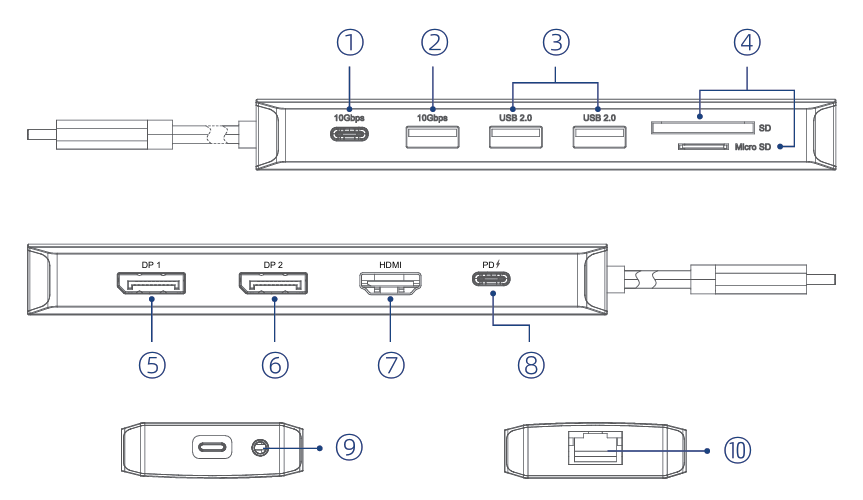
① USB-C 10Gbps
② USB-A 10Gbps
③ USB 2.0
④ SD/Micro SD
⑤ DP 1
⑥ DP 2
⑦ HDMI
⑧ PD IN 100W
⑨ Audio/Mic
⑩ RJ45 Ethernet
Introduction
This triple display docking station can help your laptop connect with different devices simultaneously. Connect HDMI screens or DP screen to corresponding ports relatively and you can view HD images. SD/Micro SD card reader slots offer more choices to process data. Gigabit Ethernet facilitates your browsing experience. The USB-C plug can provide PD 85W upstream charging.
Features
- Three ports(DP1+DP2+HDMI) work for video output.
- It supports max. 8K@30Hz or 4K@144Hz display.
- The USB-C provides upstream devices with PD 85W power delivery.
- One RJ45 Ethernet port provides 2.5G Ethernet network, and is backward compatible with 1000/100/10Mbps network.
- Two USB-A ports transfer speed up to 480Mbps, and are backward compatible with USB 1.1.
- One USB-C and one USB-A transfer speed up to 10Gbps, and are backward compatible with USB 2.0/1.1.
- One SD/Micro SD card reader slot.
- Audio out&Mic in 3.5mm jack.
System Requirements
- Microsoft Windows 7/8/10/11
- Apple Mac OS 10.8 or later(Can extend a different display ONLY)
- Android
- Requires your computer/smartphone has at least one USB-C port with full-function
In the Box
- 1 × USB-C Triple Display Docking
- 1 × Quick Start Guide
Tips
-
It would be better to conncet a USB-C power adapter to its built-in USB-C PD port to avoid insufficient load capability.
-
HDMI and DP Ports: Only can be used when the USB-C port of your host device(laptop/smartphone/tablet) can output video.
-
USB-A port is not compatible with Apple SuperDrive/Nintendo and it is not recommended that you charge a tablet or iPad through it.
-
Some laptops may have a limitation on power output and it is recommended that you only connect an HDD/SSD external hard drive at a time.
-
For security, please use the adapter or cable that is original or owns a third-party certification to charge your laptop.