Chapter 1 Basic Information
This chapter introduces the docking station's features, appearance, and some basic information.
It contains the following sections :
• Overview
Specification
- Three HDMI ports support video output simultaneously, one HDMI port can support the resolution up to 4K@60Hz and the other two support up to 2K@60Hz.
- Extend/ Mirror video modes are available for multiple tasks.
- 130W Power Supply delivers maximum 100W power upstream to charge your laptop.
- A Gigabit Ethernet port offers fast and stable network connection.
- Five USB-A transfer speed up to 5Gbps, and are backward compatible with USB 2.0. One of USB-A ports supports 7.5W downstream charging.
- 3.5mm audio out and mic in ports for earphone, mic, and speaker connection and playing.
- SD/Micro SD v4.0 supports SDXC UHS-Ⅱ and transfers speed up to 312MB/s.
In the Box
- 1 x USB-C Triple Display Universal Docking Station
- 1 x 130W Power Adapter
- 1 x AC Power Cable
- 1 x USB-C to USB-C Cable
- 1 x Quick Start Guide
System Requirement
- Microsoft Windows 10/11
- Mac OS 11 or later
- Computer with USB-C hosts supporting full-function(DP Alt Mode, Power Delivery, Data Transfer)
Overview
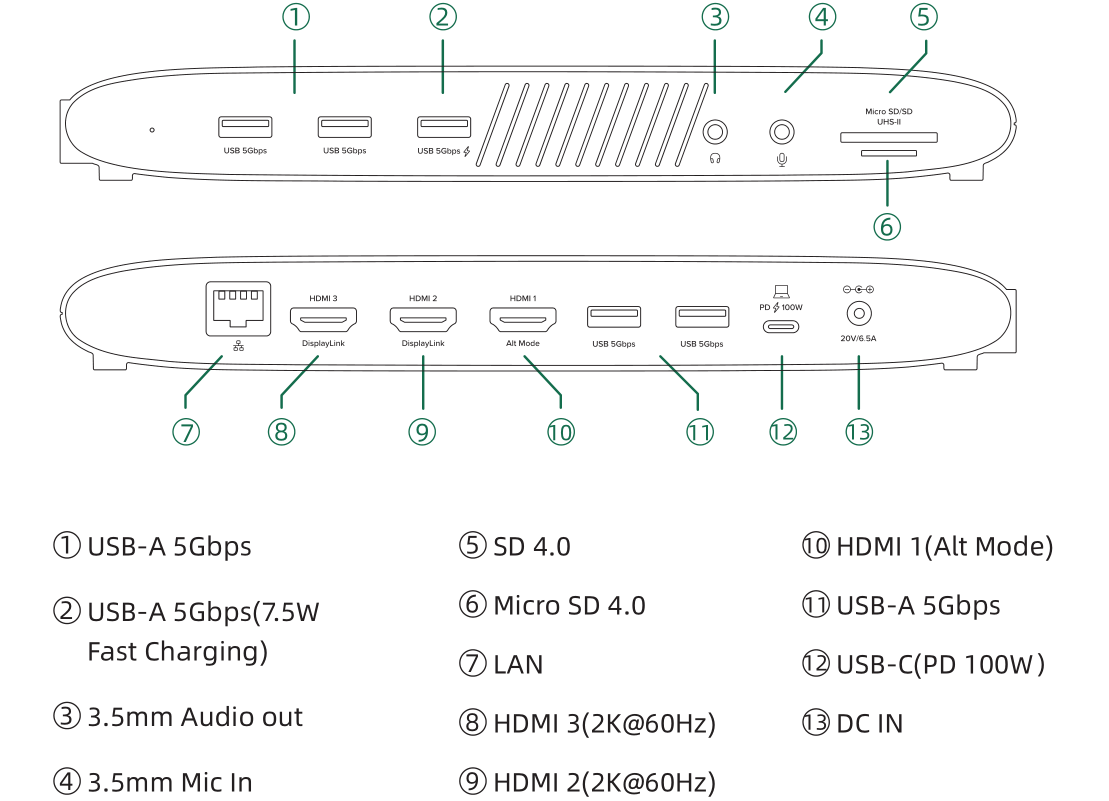
The laptop's USB-C host port should support the Alt Mode function to enable display output from HDMI 1(Alt Mode).
Connect with DP1.4 computer, HDMI 1(Alt Mode) supports 4K@60Hz display output. Connect with DP1.2 computer, HDMI 1(Alt Mode) supports 4K@30Hz display output.
More Translations Download PDF