Chapter 3 How to Connect
This chapter contains the following sections:
How to Connect
Before connection, please make sure that you have installed the driver from our website.
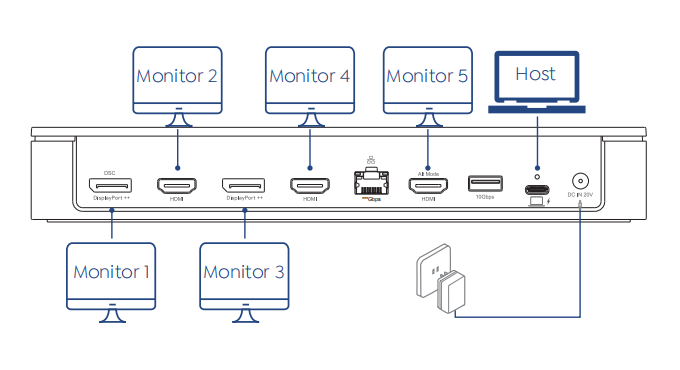
Step 1. Connect the host laptop to the USB-C upstream port.
Step 2. Connect five video ports (HDMI/DisplayPort) to your monitors.
Step 3. Connect the power adapter to the DC In, then plug the power adapter into a power source.
Display Resolution
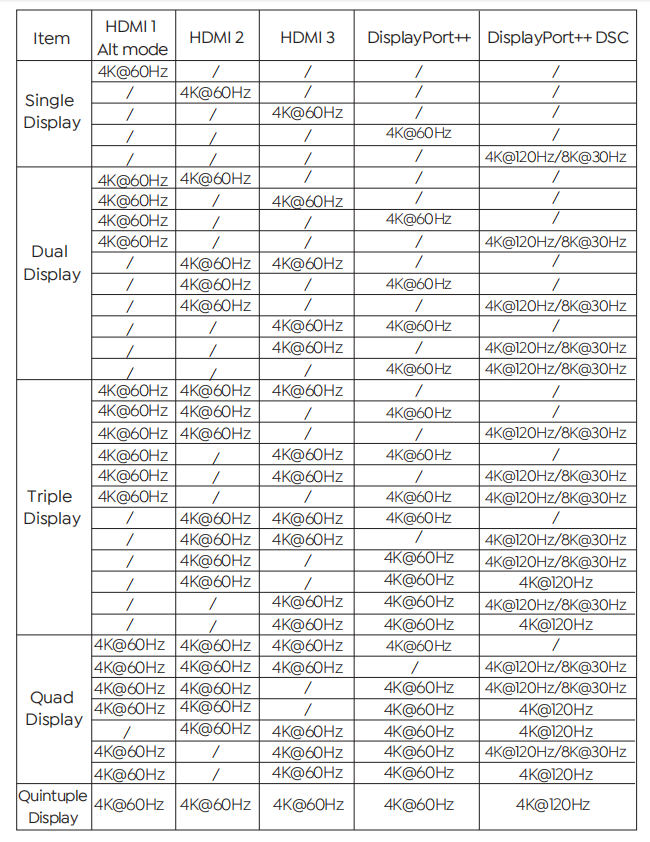
1.Ensure your laptop’s USB-C port supports video output; otherwise, the HDMI (Alt. Mode) may not work.
2.For 4K@60Hz via HDMI (Alt. Mode), your laptop must support DP 1.4 via type-C port. With DP 1.2, it will be limited to 4K@30Hz.
More Translations Download PDF