Chapter 3 Connection and Resolution
This chapter contains the following sections :
Connection
Ensuring the driver has been installed before using this docking station. Detailed driver installation steps are in the “Driver Installation” part of this user guide.
Step 1: Connect to Power
Connect the power adapter to the power jack, then plug the power adapter into a power source.
Step 2: Connect to Your Laptop
Connect the USB-C upstream port on the docking station to your laptop.
Step 3: Connect to Monitors
Connect Display 1 (HDMI or DisplayPort) and Display 2 (HDMI or DisplayPort) to monitors.
Step 4: Connect to USB Peripherals
Connect USB peripherals to USB-A/C ports according to your needs.
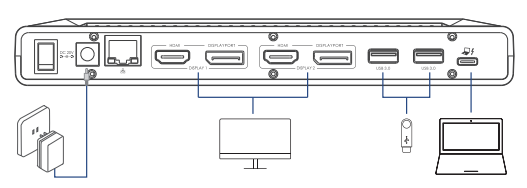
In Display 1 and Display 2, the DisplayPort and HDMI ports cannot be used simultaneously; thus,only one port in each video stream group is available.
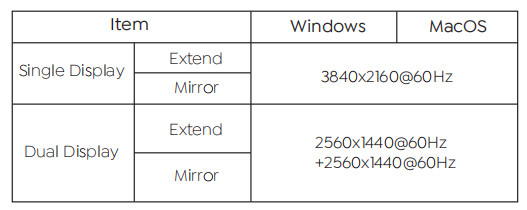
Resolution