Chapter 1 Product Overview
This chapter introduces what the router can do and shows its appearance.
It contains the following sections :
• Overview
Overview
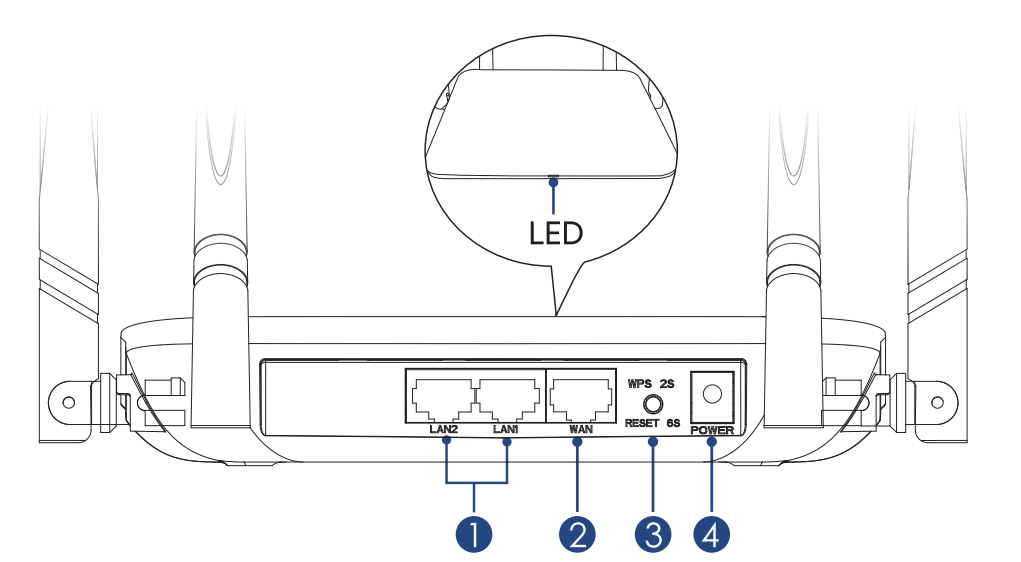
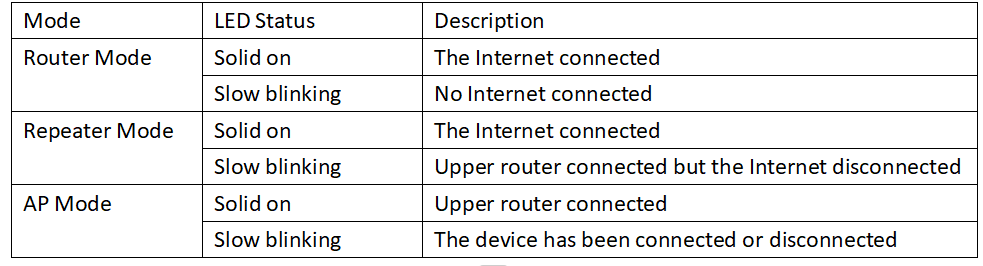
LED Indicator
 Note:
Note:
- Press the reset button for more than 6 seconds then the light is solid on.
- Press WPS button for 2-5 seconds, then the light is slowly blinking. The device connects your phone via WPS.
Basic Info
- Default IP: 192.168.20.1
- Login: http://wavlogin.link
- 2.4G SSID: WAVLINK-N_XXXX
- 5G SSID: WAVLINK-AC_XXXX
- Official Website: www.wavlink.com
- Technical Support: support@wavlink.com