Chapter 1 Overview
This chapter contains the following sections :
Hardware Overview
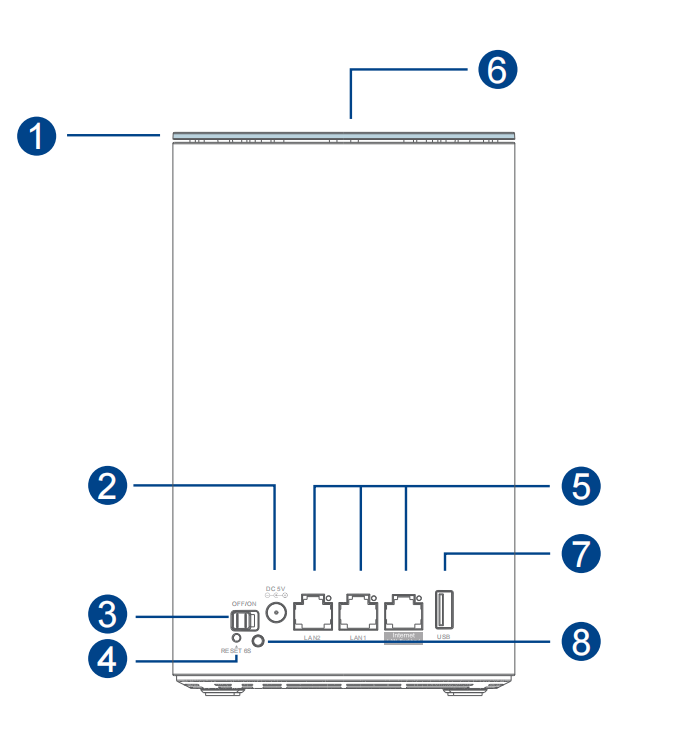
① LED Indicator
② DC IN
③ On/Off Switch
④ Reset
⑤ Gigabit Ethernet Port
⑥ TouchLink Pad
⑦ USB 2.0 port
⑧ Pair Button
Note: Pair Button: Press to connect WPS devices.
Reset Button: Press and hold for 6 seconds to reset the mesh device.
Basic Info
2.4G SSID:WAVLINK-2.4G_XXXX
5G SSID:WAVLINK-5G_1_XXXX
5G SSID:WAVLINK-5G_2_XXXX
Default IP: http://192.168.20.1
Login:http://wavlogin.link
LED Indicator
| Mode | LED | Description |
|---|---|---|
| Router/AP/Repeater Mode | Solid purple | The device is being activated |
| Router/AP/Repeater Mode | Solid blue | The Internet is connected |
| Router/AP/Repeater Mode | Slow blue flash | TouchLink is in progress |
| Router/AP/Repeater Mode | Slow red flash | No access to the Internet |
| Router/AP/Repeater Mode | Fast red flash | The device is disconnected |