Chapter 1 Overview
This chapter contains the following sections :
Hardware Overview
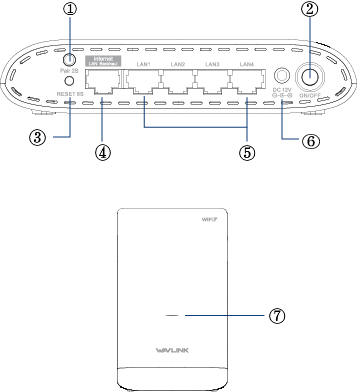
① PAIR
② Power Switch
③ RESET
④ 1×2.5 Gigabit WAN Port
⑤ 4×Gigabit LAN Port
⑥ DC 12V
⑦ LED Indicator
Basic Info
2.4G SSID:WAVLINK-Mesh_XXXX
5G SSID:WAVLINK-Mesh_XXXX
Default IP: http://192.168.20.1
Login:http://wavlogin.link
LED Indicator
| Mode | LED Status and Description |
|---|---|
| Router Mode | Blue on:The Internet connected Fast blinking in red:No Internet connected Slow blinking in blue:In pairing |
| Repeater Mode | Blue on:The Internet connected Slow blinking in red:Upper router connected but the Internet disconnected Fast blinking in red: Upper router disconnected |
| AP Mode | Blue on: The Internet connected Fast blinking in red:No Internet connected Slow blinking in blue:In pairing |
Pair Button: Press and hold Pair for 2 seconds then release, and the LED will turn slow-flashing blue to add an extra mesh device to the existing Wi-Fi system.
Reset Button: Press and hold Reset for 6 seconds then release, and the LED will turn solid purple to reset the mesh devices.
More Translations Download PDF