Chapter 1 Overview
This chapter contains the following sections :
• Overview
Overview
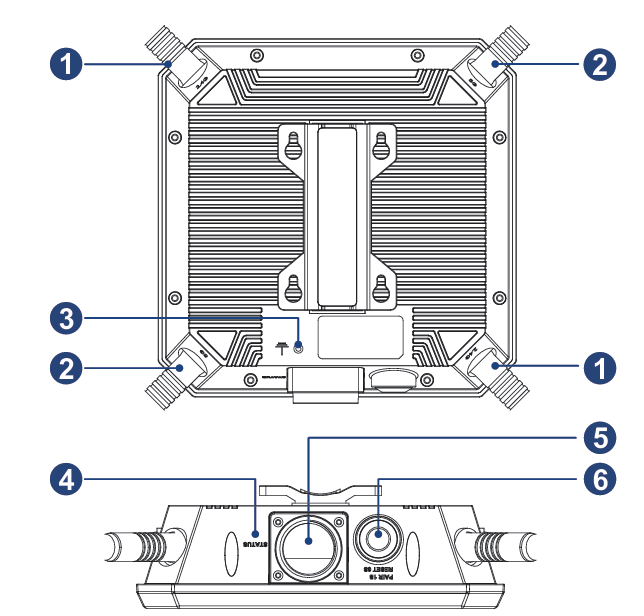
① 2.4G Antenna
② 5G Antenna
③ Grounding Terminal
④ Status LED
⑤ WAN/LAN Port (PoE)
⑥ Pair/Reset Button
Reset Button
Press and hold for 6 seconds to restore the device to default settings.
Pair Button
Press and hold for 2 seconds to pair with the existing Everything Mesh Wi-Fi system.
Basic Information
2.4G SSID: WAVLINK-N_XXXX
5G SSID: WAVLINK-AC_XXXX
Default IP: 192.168.30.1
Login: http://waplogin.link
Official Website: www.wavlink.com
Technical Support: support@wavlink.com
LED Indicator
| Mode | LED Status | Description |
|---|---|---|
| Mesh Router Mode | Solid on | The device has connected to the Internet. |
| Mesh Router Mode | Slow blinking | The device is pairing. |
| Mesh Router Mode | Fast blinking | No Internet. |
| Repeater Mode | Solid on | The device has connected to the upstream router and the Internet has been connected. |
| Repeater Mode | Slow blinking | The device has connected to the upstream router but no access to the Internet. |
| Repeater Mode | Fast blinking | The device has not connected to the upstream router. |
| Mesh Extender Mode | Solid on | The device has connected to the upstream router and the Internet has been connected. |
| Mesh Extender Mode | Slow blinking | The device has connected to the upstream router but no access to the Internet. |
| Mesh Extender Mode | Fast blinking | The device has not connected to the upstream router. |
| AP Mode | Solid on | The device has connected/disconnected to the Internet. |