How to Connect
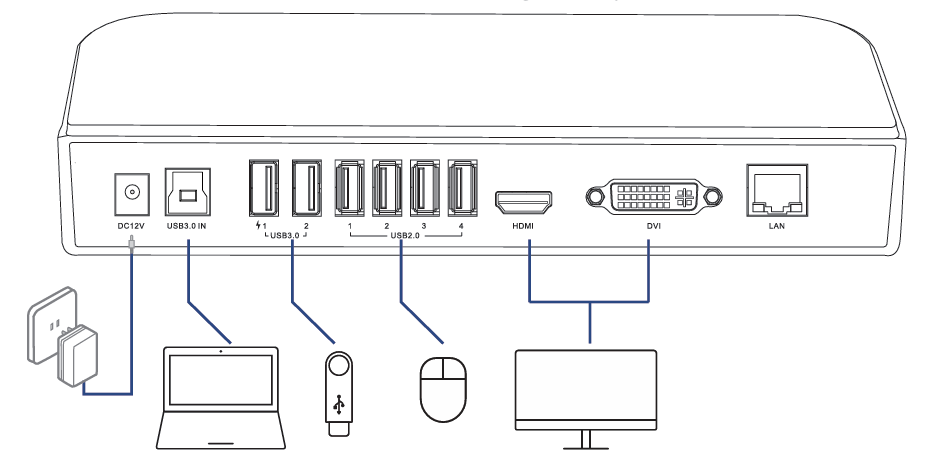
This chapter introduces the steps of connecting the docking station.
Ensuring the driver has been installed before using this Docking Station.
Step 1: Connect to Power
Connect the Power Adapter to the DC Power Port, then plug the Power Adapter into a power source.
Step 2: Connect to Your Laptop
Connect the USB 3.0 IN port on the Docking Station to your laptop via the provided USB 3.0 Type-A to Type-B Cable. Please use the provided USB-A to USB-C Adapter if your computer only has a USB-C port.
Step 3: Connect to Monitors
Connect the HDMI and DVI ports to monitors according to your needs.
Step 4: Connect to USB Peripherals
Connect USB peripherals to USB 2.0 or USB 3.0 ports according to your needs.
Please scan the QR code or visit the link to watch the installation video.
- For YouTube: https://youtu.be/jbGdVo2bbq0?si=ClFMjOyDXSx4U-kY
- For WAVLINK Official Website: https://www.wavlink.com/en_us/video/d02b551b38.html