Overview
This chapter contains the following sections:
• Overview
1. Overview
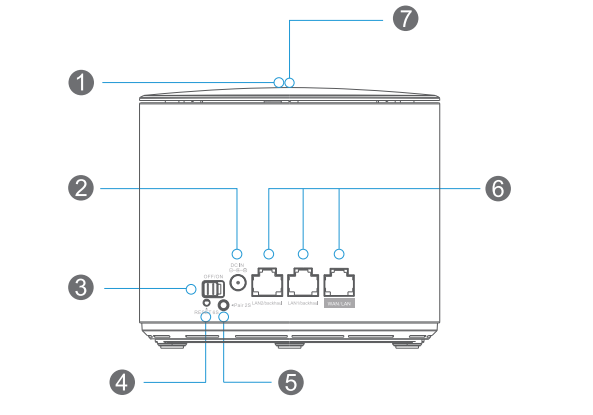
① LED Indicator
② DC Jack
③ On/Off Switch
④ Reset Button
⑤ Pair Button
⑥ Gigabit Ethernet Ports
⑦ Touchlink Pad
1 . Pair Button: Press and hold for 2 seconds to add an extra mesh device to the existing Wi-Fi system.
2 . Reset Button: Press and hold for 6 seconds to reset the mesh device.
2. LED Indicators
| LED | Description |
|---|---|
| Blue light | Internet is connected |
| Slow flashing (Red light) | Internet is disconnected |
| Quick flashing (Red light) | The extender is disconnected |
| Flashing (Blue light) | Touchlink/Pair mode is on |
3. Basic Info
Default IP:192.168.20.1
Login: http://wavlogin.link
Mesh SSID: WAVLINK-Mesh_XXXX
Touchlink SSID: WAVLINK_Touch
Tips
"XXXX" in SSID is for illustrative purposes only, please refer to the last 4 digits of the MAC address of the label on the bottom of the product.