Chapter 1 Overview
This chapter contains the following sections :
Product Overview
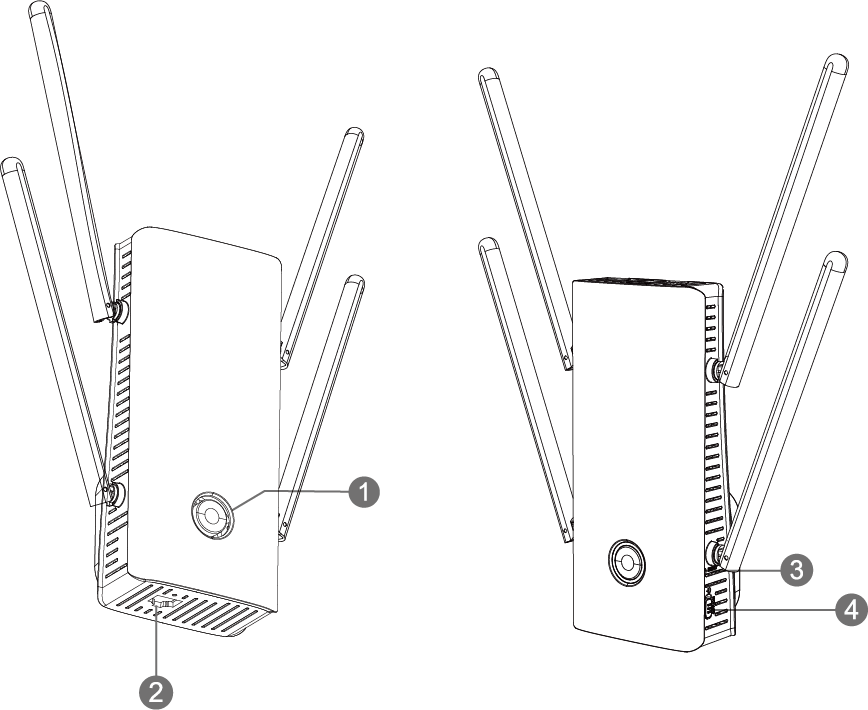
① WPS/Mesh Pair Button
② WAN/LAN Gigabit Port
③ Reset Button
④ Power Button(Off/On)
WPS/Mesh Pair Button:
In AP Mode, press and hold WPS for 2 seconds to connect to downstream devices.
In Repeater Mode, press and hold the WPS Button for 2 seconds to connect to the downstream devices and for 8 seconds to connect to the upstream router.
In Mesh Extender and Mesh Router Mode, press and hold the Mesh Pair Button for 2 seconds to pair.
Reset Button:
Press and hold the button for 6 seconds to reset to product's factory settings.
Basic Info
SSID: WAVLINK-AX_XXXX
Default IP: 192.168.10.1
Login: http://waplogin.link
Official Website: www.wavlink.com
Technical Support: support@wavlink.com
LED Indicator
| Light Color | Light Status | Description |
|---|---|---|
| Purple | Solid | The device is being activated. |
| Red | Fast Blinking | The device is not connected to the higher-level router. |
| Red | Slow Blinking | The device doesn't have access to the Internet. |
| Blue | Fast Blinking | Pairing with the WPS of an higher-level router. |
| Blue | Slow Blinking | The phone is pairing with WPS. |
| Blue | Slow Blinking | Press the pair button for Mesh pairing. |
| Blue | Solid | The Internet is connected and stable. |
| Blue | Solid | AP Mode. |
Fast: Blinking every 0.3s.
Slow: Blinking every 1.2s.