Chapter 3 Driver Setup
DRIVER SETUP
After installation, please visit the following website to download the latest driver for PCI-E adapter. www.wavlink.com > SUPPORT> Driver > Search WL-WN675X3, or click www.wavlink.com/en_us/WL-WN675X3 for driver downloading.
- Unzip the file, then you'll see two files, BT-xxx-Win10-Win11.exe is for Bluetooth and the other WiFi-xxx-Win10-Win11.exe is for Windows. Please double-click the one for Windows.

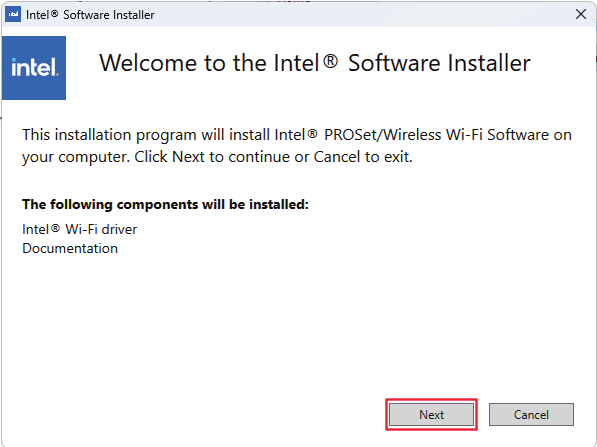
- Then installer requires you to click "Next" for further setup.
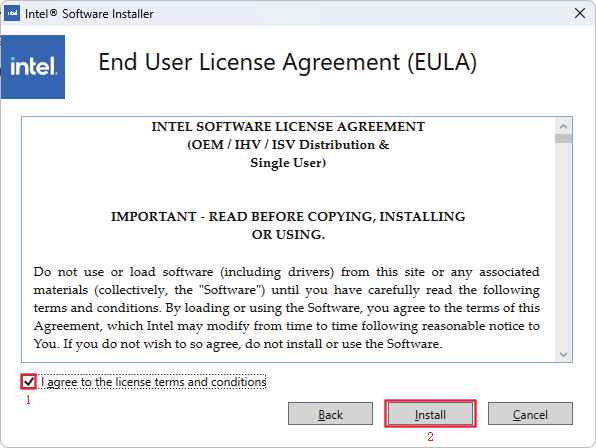
- Now please agree to the license terms and conditions, and click "Install".
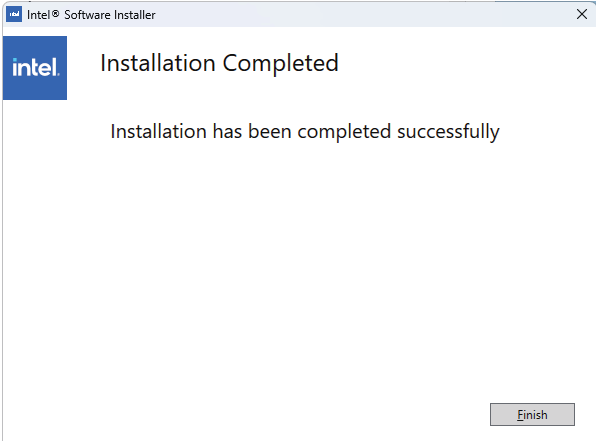
- Please wait patiently for the installer to complete the setup process, click "Finish", after completing the installation.
Firstly you need to find the right WLAN name if your WL-WN675X3, then you can set it up if neccessary, you can also change the name in "Network Connections".
FEDERAL COMMUNICATIONS COMMISSION INTERFERENCE STATEMENT
This equipment has been tested and found to comply with the limits for a Class B digital device, pursuant to Part 15 of the FCC Rules. These limits are designed to provide reasonable protection against harmful interference in a residential installation.This equipment generates, uses and can radiate radio frequency energy and, if not installed and used in accordance with the instructions, may cause harmful interference to radio communications. However, there is no guarantee that interference will not occur in a particular installation.If this equipment does cause harmful interference to radio or television reception, which can be determined by turning the equipment off and on, the user is encouraged to try to correct the interference by one or more of the following measures:
- Reorient or relocate the receiving antenna.
- Increase the separation between the equipment andreceiver.
- Connect the equipment into an outlet on a circuit different from that to which the receiver is connected.
- Consult the dealer or an experienced radio/TV technician for help.
AFTERSALE SERVICE