How to Connect
This chapter introduces the steps of connecting the docking station.
Ensuring the driver has been installed before using this Docking Station.
Step 1: Connect to Power
Connect the Power Adapter to the DC Power Port, then plug the Power Adapter into a power source.
Step 2: Connect to Your Laptop
Connect the USB-C Upstream Port on the Docking Station to your laptop.
Step 3: Connect to Monitors
Connect Display 1 (HDMI or DisplayPort) and Display 2 (HDMI or DisplayPort) to monitors.
Step 4: Connect to USB Peripherals
Connect USB peripherals to USB 2.0 or USB 3.0 ports according to your needs.
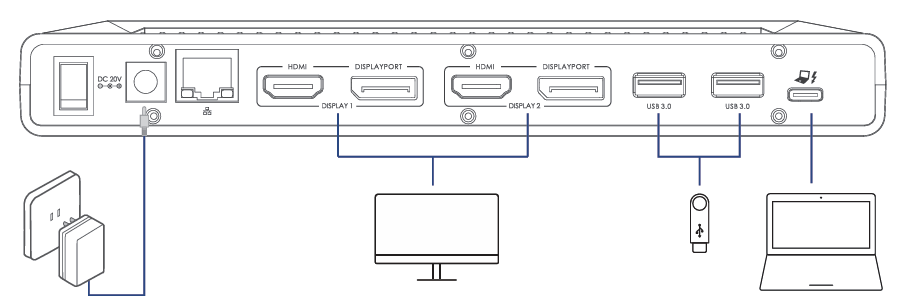
Note: In Display 1 and Display 2, the DisplayPort and HDMI ports cannot be used simultaneously; thus, only one port in each video stream group is available.
Please scan the QR code or visit the link to watch the installation video.
- For YouTube: https://youtu.be/b6WkXnI0lLY?si=IwVGnsDN-eIcP7oQ
- For WAVLINK Official Website: https://www.wavlink.com/en_us/video/20e3de1f4c.html