Chapter 2 Connection and Resolution
This chapter contains the following sections :
Connection and Resolution
How to Connect
Step 1. Connect the host laptop to USB-C Upstream port.
Step 2. Connect Display 1(HDMI or DisplayPort) and Display 2(HDMI or DisplayPort) to monitors.
Step 3. Connect the Power Adapter to the DC In, then plug the Power Adapter into power source.
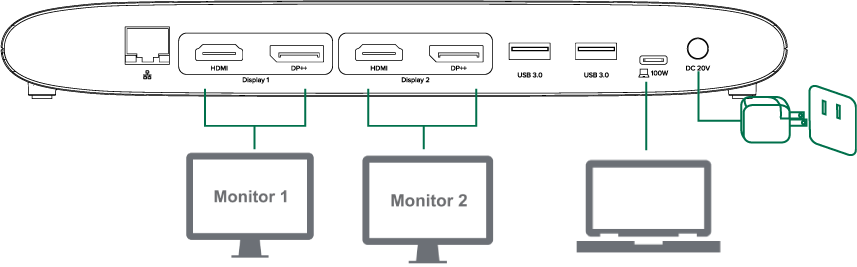
Note: In Display 1 and Display 2, DisplayPort and HDMl port cannot be used simultaneously, thus, one port in each video stream group is available.
Display Resolution
| Display Mode | Windows/Mac |
|---|---|
| Single Extend/Mirror Display | HDMI: 4K(4096×2160)@60Hz DisplayPort: 5K(5120×1440)@60Hz |
| Dual Extend/Mirror Display | Dual HDMI: 4K(4096×2160)@60Hz Dual DisplayPort: 5K(5120×1440)@60Hz HDMI+DisplayPort: 4K(4096×2160)@60Hz+5K(5120×1440)@60Hz |