Chapter 2 Connection and Resolution
This chapter contains the following sections :
• Power On
Connection and Resolution
Power On
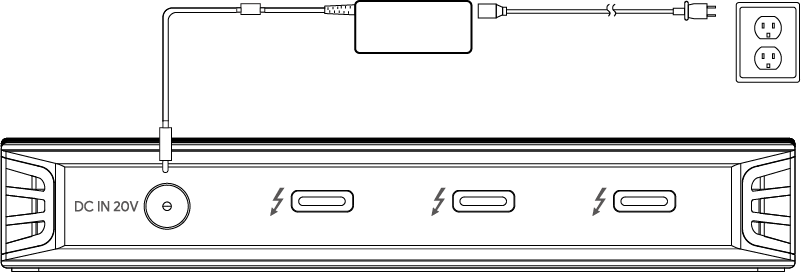
Plug one end of the included Power Adapter into this Thunderbolt 4 dock's DC IN 20V port and the other end into the power outlet, when the dock is connected to the power adapter, the Power LED is bright blue, and when it is connected to the computer, the Link LED will be bright green.
Connecting to the Host
Connect the Thunderbolt 4 upstream port via the provided Thunderbolt 4 cable to your laptop, this Thunderbolt 4 cable will charge your laptop at the maximum 90W Smart Power Delivery.
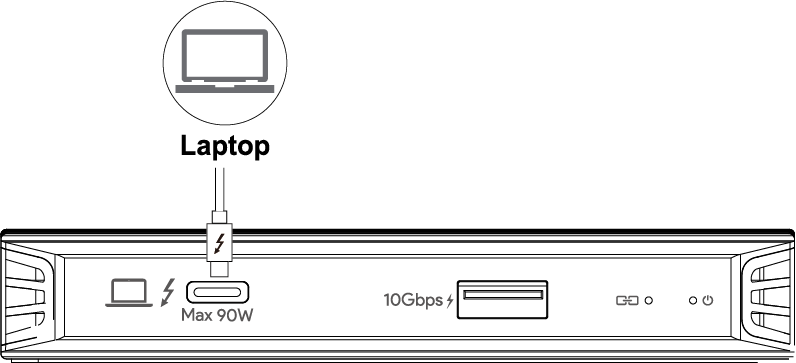
Smart Power: This product can intelligently adjust the charging power of the host according to the power of the connected devices.
Connecting to the Monitor
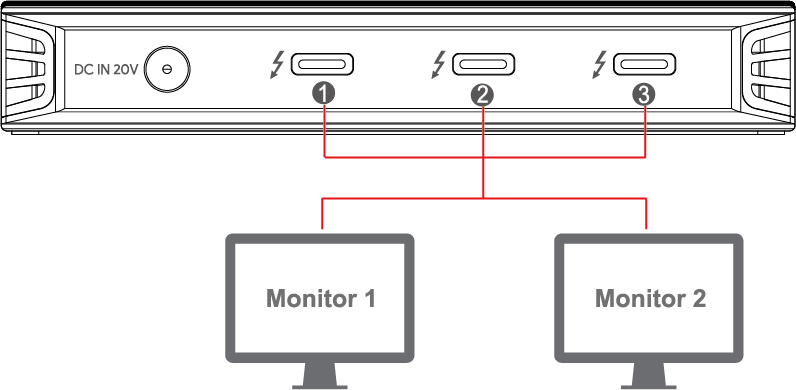
This Thunderbolt 4 dock can connect up to 2 displays.
Display Resolution
| Single Display | Dual Display |
|---|---|
| 7680*4320(8K)@30Hz | 4096*2160(4K)@60Hz |
 | + |
 | + |
| + |
| + |
Note:
- Single 8K@60Hz is enabled for computers with DP1.4 or higher and DSC.
- Three downstream TBT4 interfaces support single-channel 7680×4320(8K)@30Hz or dual-channel 4096×2160(4K)@60Hz video output.
- Those three Thunderbolt 4 downstream ports can just expand up to 2 monitors.
- For MAC using Apple M1/M2 chip, three Thunderbolt 4 downstream ports will have only one video output.