Chapter 1 Overview
This chapter contains the following sections:
Hardware Overview
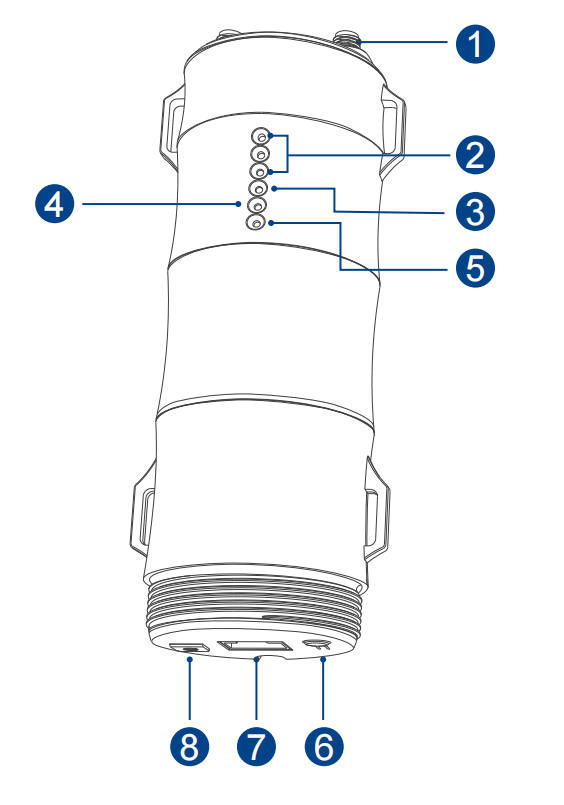
① 2.4G RP-SMA Antenna Connectors
② Wi-Fi Signal LED
③ Wi-Fi LED
④ WAN/LAN LED
⑤ POWER LED
⑥ Reset Button
⑦ WAN/LAN Port (POE)
⑧ Grounding Terminal
Default Parameters
Default IP: 192.168.10.1
Login:http://waplogin.link
2.4G SSID: WAVLINK-N_XXXX
Technical Support: support@wavlink.com
LED Indicators
| Position | LED Status | Description |
|---|---|---|
| Power | ON | The device is powered on. |
| Power | OFF | The device is not receiving electrical power. |
| WAN/LAN | ON | The Ethernet port is connected. |
| WAN/LAN | OFF | The Ethernet port is disconnected. |
| WAN/LAN | Flashing | Transferring data to/form a network device. |
Wi-Fi Signal
| Mode |  |  |  | Description |
|---|---|---|---|---|
| AP/Router | ON | ON | ON | High Transmit Power |
| AP/Router | ON | ON | OFF | Medium Transmit Power |
| AP/Router | ON | OFF | OFF | Low Transmit Power |
| Repeater | ON | ON | ON | Better reception: signal 81%-100% |
| Repeater | ON | ON | OFF | Good reception: signal 60%~80% |
| Repeater | ON | OFF | OFF | Weak reception: signal below 0%~59% |
| Repeater | Flashing | OFF | OFF | Disconnected |